Line thinning
- crabshank
- Topic Author
Less
More
Designed to thin lines to increase acutance:
S-curves + Line thinning + Gamma on right (for the PES 2020 screenshots):
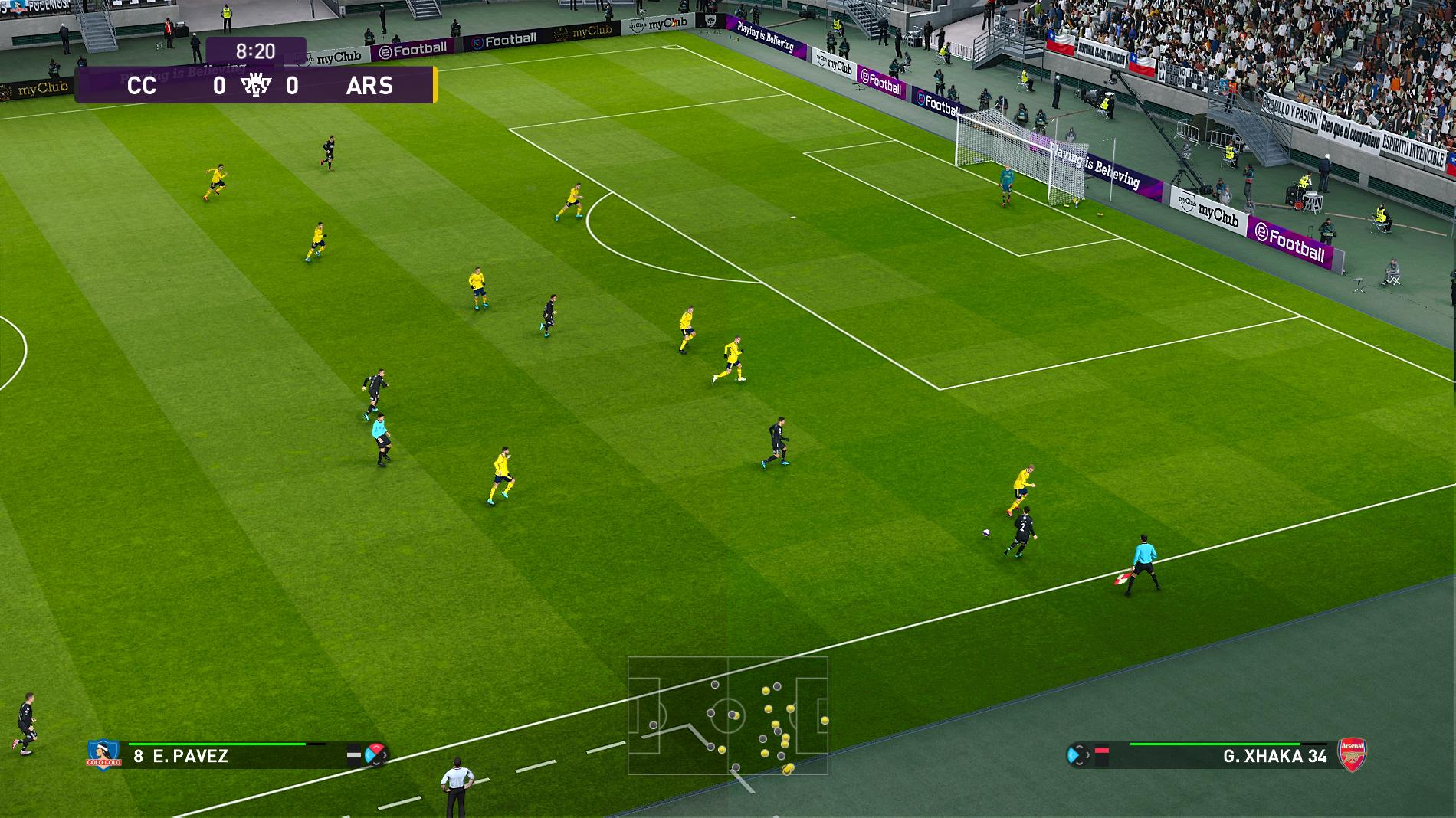
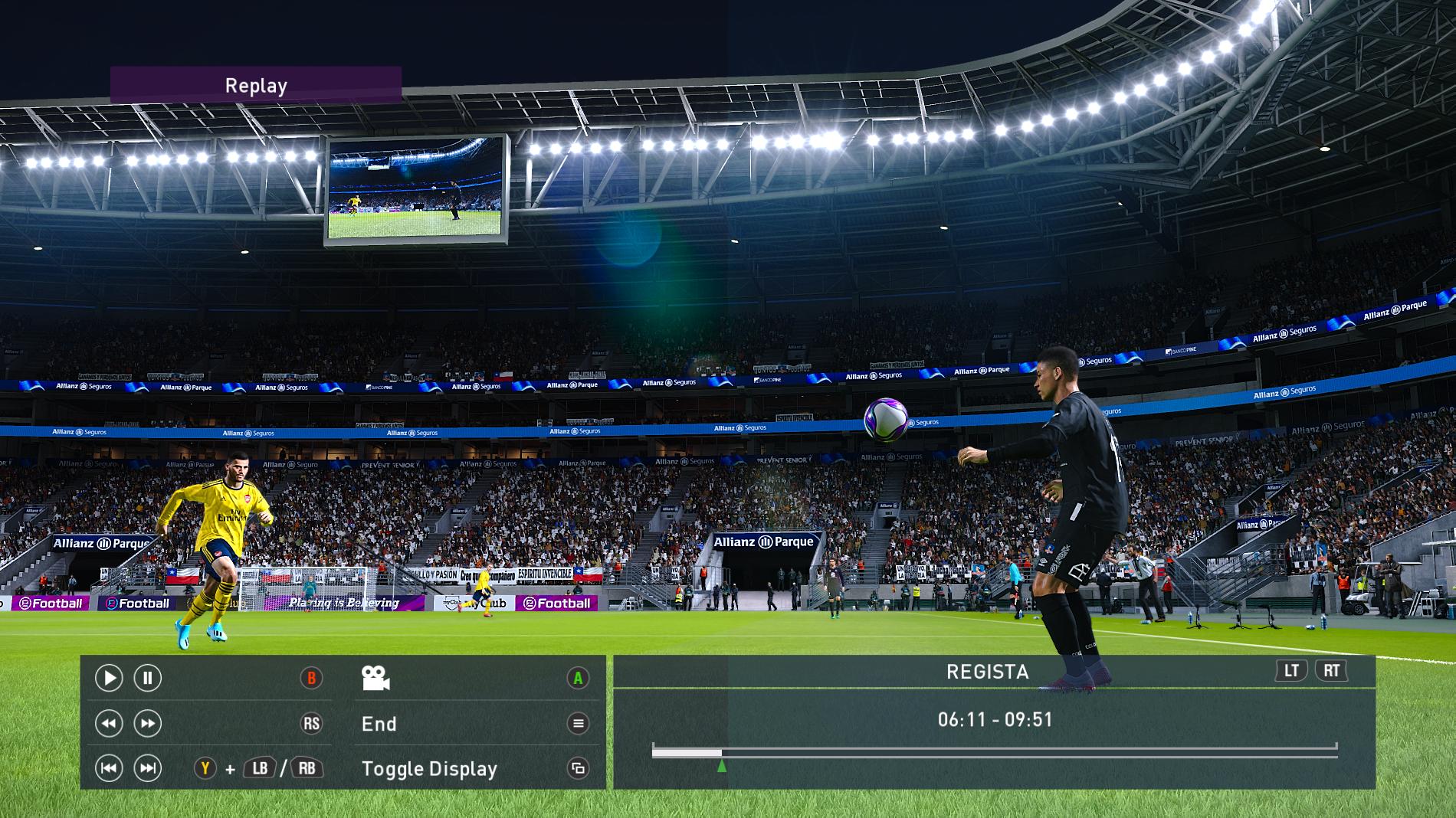


"DrawText_mod.fxh" for 2D input (like in my White Point and Grey gamma shaders):
Video shader version is here .
S-curves + Line thinning + Gamma on right (for the PES 2020 screenshots):
Code:
#include "ReShadeUI.fxh";
uniform float LOD < __UNIFORM_DRAG_FLOAT1
ui_min = -1.0; ui_max = 10.0;
ui_tooltip = "Lower retains more detail.";
> = 0.25;
uniform float Brightness < __UNIFORM_DRAG_FLOAT1
ui_min = -1.0; ui_max = 10.0;
ui_tooltip = "Adjust LOD with this at 1 first, then adjust this. Higher => darker.";
> = 1.0;
uniform bool Two_dimensional_input <> = false;
uniform int Two_dimensional_input_type <__UNIFORM_COMBO_INT1
ui_items = "Crosshairs on\0Crosshairs off\0";
> = 0;
uniform float LOD_Brightness_Range < __UNIFORM_SLIDER_FLOAT1
ui_min = 0.0; ui_max = 7.0;
> = 1.0;
uniform int dxy < __UNIFORM_SLIDER_INT1
ui_min = 0; ui_max = 100;
ui_tooltip = "No. of adjacent pixels to include in the sample.";
> = 2;
uniform bool Final_grey_S_curve <> = false;
uniform float greyChangeAmnt < __UNIFORM_DRAG_FLOAT1
ui_min = 0.0; ui_max = 5.0;
> = 1;
uniform bool Omit_centre_pixel <> = false;
uniform bool Debug <
ui_tooltip = "Shows adjustment in greyscale.";
> = false;
uniform bool Split <> = false;
uniform bool Flip_split <> = false;
uniform float Split_position < __UNIFORM_SLIDER_FLOAT1
ui_min = 0; ui_max =1;
ui_tooltip = "0 is on the far left, 1 on the far right.";
> = 0.5;
#include "ReShade.fxh"
#include "DrawText_mod.fxh"
uniform bool buttondown < source = "mousebutton"; keycode = 0; mode = ""; >;
uniform float2 mousepoint < source = "mousepoint"; >;
float4 PS_LineThin(float4 pos : SV_Position, float2 texcoord : TEXCOORD0) : SV_Target
{
float4 c0=tex2D(ReShade::BackBuffer, texcoord);
float4 c1=c0;
float LOD_Range=(BUFFER_WIDTH>=BUFFER_HEIGHT)?LOD_Brightness_Range*(BUFFER_RCP_HEIGHT/BUFFER_RCP_WIDTH):LOD_Brightness_Range;
float Brightness_Range=(BUFFER_WIDTH>=BUFFER_HEIGHT)?LOD_Brightness_Range:LOD_Brightness_Range*(BUFFER_RCP_WIDTH/BUFFER_RCP_HEIGHT);
float LOD= (buttondown==0 && Two_dimensional_input==1)? mousepoint.x*ReShade::PixelSize.x*((LOD+0.5*LOD_Range)-(LOD-0.5*LOD_Range))+(LOD-0.5*LOD_Range):LOD;
float LOD_Pos=(buttondown==1 && Two_dimensional_input==1)?(LOD-(LOD-0.5*LOD_Range))/((LOD+0.5*LOD_Range)-(LOD-0.5*LOD_Range)):mousepoint.x*ReShade::PixelSize.x;
float Brightness= (buttondown==0 && Two_dimensional_input==1)?mousepoint.y*ReShade::PixelSize.y*((Brightness+0.5*Brightness_Range)-(Brightness-0.5*Brightness_Range))+(Brightness-0.5*Brightness_Range):Brightness;
float Brightness_Pos=(buttondown==1 && Two_dimensional_input==1)?(Brightness-(Brightness-0.5*Brightness_Range))/((Brightness+0.5*Brightness_Range)-(Brightness-0.5*Brightness_Range)):mousepoint.y*ReShade::PixelSize.y;
float c0Max=max(c0.r,max(c0.g,c0.b));
int x=0;
int y=0;
float count=0;
float accm=0;
for (x=-1*dxy; x<=dxy; x+=1){
for (y=-1*dxy; y<=dxy; y+=1){
float4 current=tex2Dlod(ReShade::BackBuffer, float4(texcoord.x+float(x)*BUFFER_RCP_WIDTH, texcoord.y+float(y)*BUFFER_RCP_HEIGHT, 0, 0));
float currentMax=max(current.r,max(current.g,current.b));
float omit=(float2(float(x),float(y))==float2(0,0))?1:0;
accm=(omit*Omit_centre_pixel==1)?accm:accm+currentMax;
count=(omit*Omit_centre_pixel==1)?count:count+1;
}
}
float surrAvg=accm*pow(count,-1);
float dMax=max(1-surrAvg,max(surrAvg,max(1-c0Max,c0Max)));
float finalVal=pow(abs(c0Max),LOD*(dMax+1));
finalVal=pow(finalVal,Brightness);
c1.rgb=finalVal*(c1.rgb/c0Max);
float color=max(c1.r,max(c1.g,c1.b));
float colorOG=color;
color*=2;
color=(color<0.5)?pow(abs(0.5*color),greyChangeAmnt):1-(0.5*pow(abs(2-color),greyChangeAmnt));
c1.rgb=(Final_grey_S_curve==1)?saturate(color*(c0.rgb/colorOG)):c1.rgb;
float cl2=max(c1.r,max(c1.g,c1.b));
float cl3=(Final_grey_S_curve==1)?cl2:finalVal;
c1.rgb=(Debug!=1)?c1.rgb:cl3;
float4 c2=(texcoord.x>=Split_position*Split)?c1:c0;
float4 c3=(texcoord.x<=Split_position*Split)?c1:c0;
float4 c4=(Flip_split==1 && Split==1)?c3:c2;
float divLine = abs(texcoord.x - Split_position) < BUFFER_RCP_WIDTH;
c4 =(Split==0)?c4: c4*(1.0 - divLine); //invert divline
c4.rgb =(Two_dimensional_input==1 && Two_dimensional_input_type==0 && (abs(texcoord.x-LOD_Pos)<BUFFER_RCP_WIDTH || abs(texcoord.y-Brightness_Pos)<BUFFER_RCP_HEIGHT))?float3(0.369,0.745,0):c4.rgb;
c4.rgb =(Two_dimensional_input==1 && Two_dimensional_input_type==1 && (abs(texcoord.x-LOD_Pos)<3*BUFFER_RCP_WIDTH && abs(texcoord.y-Brightness_Pos)<3*BUFFER_RCP_HEIGHT))?float3(0.498,1,0):c4.rgb;
float4 res =float4(c4.rgb,0);
float textSize=33;
[flatten]if(Two_dimensional_input==1){
DrawText_Digit( DrawText_Shift(DrawText_Shift(float2(0.5*BUFFER_WIDTH,0), int2(-9, 0), textSize, 1), int2(8, 0), textSize, 1) ,
textSize, 1, texcoord, 3, LOD, res,1); //Customxy.x
DrawText_Digit(DrawText_Shift(DrawText_Shift(float2(0.5*BUFFER_WIDTH,0), int2(-9, 1), textSize, 1), int2(8, 0), textSize, 1) ,
textSize, 1, texcoord, 3, Brightness, res,1);
}
c4.rgb=res.rgb;
return c4;
}
technique Line_Thinning {
pass LineThin {
VertexShader=PostProcessVS;
PixelShader=PS_LineThin;
}
}
"DrawText_mod.fxh" for 2D input (like in my White Point and Grey gamma shaders):
Code:
//Original by kingeric1992, modded by crabshank 08/10/2019
#ifndef _DRAWTEXT_H_
#define _DRAWTEXT_H_
#define _DRAWTEXT_GRID_X 14.0
#define _DRAWTEXT_GRID_Y 7.0
///////////////////////////////////////////////////////////////////////////////////////////////////////
// //
// Available functions: //
// DrawText_String( offset, text size, xy ratio, input coord, string array, array size, output) //
// float2 offset = top left corner of string, screen hight pixel unit. //
// float text size = text size, screen hight pixel unit. //
// float xy ratio = xy ratio of text. //
// float2 input coord = current texture coord. //
// int string array = string data in float2 array format, ex: "Demo Text" //
// int String0[9] = { __D, __e, __m, __o, __Space, __T, __e, __x, __t}; //
// int string size = size of the string array. //
// float output = output. //
// //
// DrawText_Digit( offset, text size, xy ratio, input coord, precision after dot, data, output) //
// float2 offset = same as DrawText_String. //
// float text size = same as DrawText_String. //
// float xy ratio = same as DrawText_String. //
// float2 input coord = same as DrawText_String. //
// int precision = digits after dot. //
// float data = input float. //
// float output = output. //
// //
// float2 DrawText_Shift(shift, text size, xy ratio) //
// float2 shift = shift line(y) and column. //
// float text size = same as DrawText_String. //
// float xy ratio = same as DrawText_String. //
// //
///////////////////////////////////////////////////////////////////////////////////////////////////////
//Sample Usage
/*
float4 main_fragment( float4 position : POSITION,
float2 txcoord : TEXCOORD) : COLOR {
float res = 0.0;
int line0[9] = { __D, __e, __m, __o, __Space, __T, __e, __x, __t }; //Demo Text
int line1[15] = { __b, __y, __Space, __k, __i, __n, __g, __e, __r, __i, __c, __1, __9, __9, __2 }; //by kingeric1992
int line2[6] = { __S, __i, __z, __e, __Colon, __Space }; // Size: %d.
DrawText_String(float2(100.0 , 100.0), 32, 1, txcoord, line0, 9, res);
DrawText_String(float2(100.0 , 134.0), textSize, 1, txcoord, line1, 15, res);
DrawText_String(DrawText_Shift(float2(100.0 , 134.0), int2(0, 1), textSize, 1), 18, 1, txcoord, line2, 6, res);
DrawText_Digit(DrawText_Shift(DrawText_Shift(float2(100.0 , 134.0), int2(0, 1), textSize, 1), int2(8, 0), 18, 1),
18, 1, txcoord, 0, textSize, res);
return res;
}
*/
//Text display
//Character indexing
#define __Space 0 // (space)
#define __Exclam 1 // !
#define __Quote 2 // "
#define __Pound 3 // #
#define __Dollar 4 // $
#define __Percent 5 // %
#define __And 6 // &
#define __sQuote 7 // '
#define __rBrac_O 8 // (
#define __rBrac_C 9 // )
#define __Asterisk 10 // *
#define __Plus 11 // +
#define __Comma 12 // ,
#define __Minus 13 // -
#define __Dot 14 // .
#define __Slash 15 // /
#define __0 16 // 0
#define __1 17 // 1
#define __2 18 // 2
#define __3 19 // 3
#define __4 20 // 4
#define __5 21 // 5
#define __6 22 // 6
#define __7 23 // 7
#define __8 24 // 8
#define __9 25 // 9
#define __Colon 26 // :
#define __sColon 27 // ;
#define __Less 28 // <
#define __Equals 29 // =
#define __Greater 30 // >
#define __Question 31 // ?
#define __at 32 // @
#define __A 33 // A
#define __B 34 // B
#define __C 35 // C
#define __D 36 // D
#define __E 37 // E
#define __F 38 // F
#define __G 39 // G
#define __H 40 // H
#define __I 41 // I
#define __J 42 // J
#define __K 43 // K
#define __L 44 // L
#define __M 45 // M
#define __N 46 // N
#define __O 47 // O
#define __P 48 // P
#define __Q 49 // Q
#define __R 50 // R
#define __S 51 // S
#define __T 52 // T
#define __U 53 // U
#define __V 54 // V
#define __W 55 // W
#define __X 56 // X
#define __Y 57 // Y
#define __Z 58 // Z
#define __sBrac_O 59 // [
#define __Backslash 60 // \..
#define __sBrac_C 61 // ]
#define __Caret 62 // ^
#define __Underscore 63 // _
#define __Punc 64 // `
#define __a 65 // a
#define __b 66 // b
#define __c 67 // c
#define __d 68 // d
#define __e 69 // e
#define __f 70 // f
#define __g 71 // g
#define __h 72 // h
#define __i 73 // i
#define __j 74 // j
#define __k 75 // k
#define __l 76 // l
#define __m 77 // m
#define __n 78 // n
#define __o 79 // o
#define __p 80 // p
#define __q 81 // q
#define __r 82 // r
#define __s 83 // s
#define __t 84 // t
#define __u 85 // u
#define __v 86 // v
#define __w 87 // w
#define __x 88 // x
#define __y 89 // y
#define __z 90 // z
#define __cBrac_O 91 // {
#define __vBar 92 // |
#define __cBrac_C 93 // }
#define __Tilde 94 // ~
#define __tridot 95 // (...)
#define __empty0 96 // (null)
#define __empty1 97 // (null)
//Character indexing ends
texture Texttex < source = "FontAtlas.png"; > {
Width = 512;
Height = 512;
};
sampler samplerText {
Texture = Texttex;
};
//accomodate for undef array size.
#define DrawText_String( pos, size, ratio, tex, array, arrSize, output ) \
{ float text = 0.0; \
float2 uv = (tex * float2(BUFFER_WIDTH, BUFFER_HEIGHT) - pos) / size; \
uv.y = saturate(uv.y); \
uv.x *= ratio * 2.0; \
float id = array[int(trunc(uv.x))]; \
if(uv.x <= arrSize && uv.x >= 0.0) \
text = tex2D(samplerText, (frac(uv) + float2( id % 14.0, trunc(id / 14.0))) \
/ float2( _DRAWTEXT_GRID_X, _DRAWTEXT_GRID_Y) ).x; \
output += text; }
float2 DrawText_Shift( float2 pos, int2 shift, float size, float ratio ) {
return pos + size * shift * float2(0.5, 1.0) / ratio;
}
float mulTenIntPow(float number,float power){
float sign=(power>=0)?1:-1;
int pwr=uint(round(abs(power)));
[flatten]if(pwr>1){
for(int i=0; i<pwr;i++){
number=(sign==1)?number*10:number/10;
}
}else{
number=(sign==1)?number*10:number/10;
}
return number;
}
float rounder (float places,float number){
float sign=(number>=0)?1:-1;
int integer=int(round(mulTenIntPow(abs(number),places)));
return sign*(mulTenIntPow(float(round(integer)),-places));
}
void DrawText_Digit( float2 pos, float size, float ratio, float2 tex, int digit, float data, inout float4 res,float textGrey) {
int digits[13] = {
__0, __1, __2, __3, __4, __5, __6, __7, __8, __9, __Minus, __Space, __Dot
};
float2 uv = (tex * float2(BUFFER_WIDTH, BUFFER_HEIGHT) - pos) / size;
uv.y = saturate(uv.y);
uv.x *= ratio * 2.0;
data=rounder(digit,data);
float t = abs(data);
int numDigits = max(ceil(log2(t)/3.32192809),1);
//early exit:
if(uv.x <-numDigits-1 || uv.x > digit+1) return;
int index = 0;
[flatten]if(int(uv.x)==0){
index=round(trunc(frac(mulTenIntPow(t,-1))*10));
}else if(int(uv.x)<=-1){
index=round(trunc(frac(trunc(mulTenIntPow(t,uv.x))/10)*10));
}else if(int(uv.x)>=1){
index=round(frac(trunc(mulTenIntPow(t,int(uv.x)))/10)*10);
}
index=(int(uv.x)==0&&int(ceil(uv.x))==1)?12:index;
[flatten]if(int(uv.x)==-numDigits){
if(data>=0){
index=11;
}else{
index=10;
}
}
index=digits[int(index)];
res +=(textGrey*2-1)*tex2D(samplerText, (frac(uv) + float2( index % 14.0, trunc(index / 14.0))) /
float2( _DRAWTEXT_GRID_X, _DRAWTEXT_GRID_Y)).x;
}
#endif
Video shader version is here .
Last edit: 7 years 1 month ago by crabshank. Reason: Modded DrawText header
The following user(s) said Thank You: Wicked Sick, jas01, Viper_Joe, gamehancer, valur432
Please Log in or Create an account to join the conversation.
- Wicked Sick
Less
More
7 years 3 months ago - 7 years 3 months ago #2
by Wicked Sick
Replied by Wicked Sick on topic Line thinning
I really liked that shader, helped be have more control over the brightness of my many blooms haha But I did not understand the purpose of the DXY slider. It can cripple my PC. What does it does exactly to the image? I did not perceive a difference. Sorry for asking this if it is obvious.
EDIT: By the way. the split slider to test the changes should be default in all shaders and also in ReShade itself, maybe haha Thanks for this.
EDIT: By the way. the split slider to test the changes should be default in all shaders and also in ReShade itself, maybe haha Thanks for this.
Last edit: 7 years 3 months ago by Wicked Sick.
The following user(s) said Thank You: crabshank
Please Log in or Create an account to join the conversation.
- crabshank
- Topic Author
Less
More
Apologies, I totally messed up that port lol. It's fixed now and you're gonna get the effect I intended.
The following user(s) said Thank You: Wicked Sick
Please Log in or Create an account to join the conversation.
- Wicked Sick
Less
More
7 years 3 months ago - 7 years 3 months ago #4
by Wicked Sick
Replied by Wicked Sick on topic Line thinning
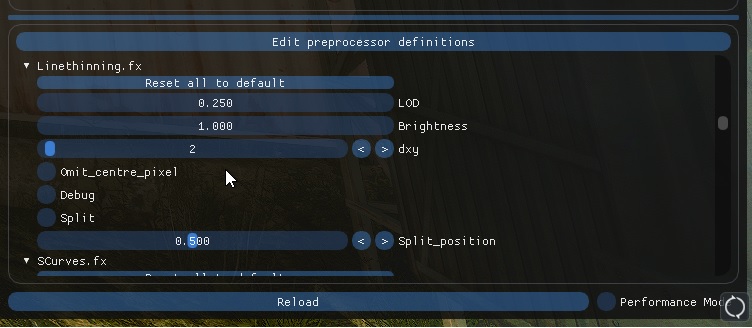
I have pasted the code from the OP onto the original file I made when I saw your topic, overwriting everything, and stuff looks really bright now, also, there is an option with an out of pattern name:
Last edit: 7 years 3 months ago by Wicked Sick.
Please Log in or Create an account to join the conversation.
- Viper_Joe
Less
More
7 years 3 months ago - 7 years 3 months ago #5
by Viper_Joe
Replied by Viper_Joe on topic Line thinning
Judging from the name, I take it this is similar to MadVR's "Thin Edges" algorithm?
Last edit: 7 years 3 months ago by Viper_Joe.
Please Log in or Create an account to join the conversation.
- crabshank
- Topic Author
Less
More
- TreyM
Less
More
- crabshank
- Topic Author
Less
More
7 years 3 months ago - 7 years 3 months ago #8
by crabshank
Replied by crabshank on topic Line thinning
Originally a video shader to thin lines in upscaled video (where the upscaler made them too thick IMO).
EDIT: Just updated the code to add a final grey S-curve after the thinning as a finishing touch.
EDIT: Just updated the code to add a final grey S-curve after the thinning as a finishing touch.
Last edit: 7 years 3 months ago by crabshank.
Please Log in or Create an account to join the conversation.
- TreyM
Less
More
EDIT: Comment removed by me.
Last edit: 7 years 3 months ago by TreyM.
Please Log in or Create an account to join the conversation.
- Martigen
Less
More
Really? This would be great for Borderlands to reduce the often exagerrated black outlines while maintaining the rest of the visuals.TreyM wrote: There is no need for this in gaming...
Just bizarre you've posted this response to him in two of his threads now. You may not be able to think of a use for a shader, but everyone else is not you.
Thank you Crabshank for sharing your shaders. Please keep doing so. The more shaders Reshade has, the more flexible and powerful it becomes.
The following user(s) said Thank You: Wicked Sick, Viper_Joe, crabshank, Lun
Please Log in or Create an account to join the conversation.
- crabshank
- Topic Author
Less
More
Martigen wrote:
Really? This would be great for Borderlands to reduce the often exagerrated black outlines while maintaining the rest of the visuals.TreyM wrote: There is no need for this in gaming...
Just bizarre you've posted this response to him in two of his threads now. You may not be able to think of a use for a shader, but everyone else is not you.
Thank you Crabshank for sharing your shaders. Please keep doing so. The more shaders Reshade has, the more flexible and powerful it becomes.
Just because you create something for one purpose doesn't mean it can't be useful for other things, this is the basis of ingenuity.
Please Log in or Create an account to join the conversation.
- TreyM
Less
More
These are video filters designed to run on the CPU (you can see this easily if you look at the code) for dealing with artifacts from video codecs. Game input to reshade is not compressed with a codec... There is no need for these filters in reshade for gaming.
My response is not "bizarre." It's grounded in reality, and if you want to adjust the outlines in BL2, just go edit the shader manually in the game files.
My response is not "bizarre." It's grounded in reality, and if you want to adjust the outlines in BL2, just go edit the shader manually in the game files.
Please Log in or Create an account to join the conversation.
- OtisInf
Less
More
A ps shader running on the CPU?TreyM wrote: These are video filters designed to run on the CPU (you can see this easily if you look at the code) for dealing with artifacts from video codecs. Game input to reshade is not compressed with a codec... There is no need for these filters in reshade for gaming.

Video post processing also runs on GPUs, why bother doing that on a CPU if a GPU is much more efficient for that?
There's no need for this kind of reply, someone made a shader, you don't like it, big deal.My response is not "bizarre." It's grounded in reality, and if you want to adjust the outlines in BL2, just go edit the shader manually in the game files.
PS: your attitude like in the post above was the main reason I left the Reshade discord.
The following user(s) said Thank You: Wicked Sick, Aelius Maximus, Lun
Please Log in or Create an account to join the conversation.
- TreyM
Less
More
There is no "attitude" here Otis, I'm simply stating the facts here. And if anyone has an attitude on these forums, it's been you repeatedly, mostly in Marty's direction, and even now with you throwing shade at me on an unrelated forum post basically because you don't like me. I couldn't care any less why you left the ReShade discord.
EDIT: Someone please lock this thread before it gets pointless.
EDIT: Someone please lock this thread before it gets pointless.
Last edit: 7 years 3 months ago by TreyM.
Please Log in or Create an account to join the conversation.
- Marty McFly
Less
More
7 years 3 months ago - 7 years 3 months ago #15
by Marty McFly
Replied by Marty McFly on topic Line thinning
Video stuff like H264 decoding also commonly runs on the CPU.
That being said, the shaders from crabshank making excessive use of branching and often not leveraging vector types suggests that the original code (if it's a port) was originally done for something else than a shader language or the author is used to CPU programming so Trey isn't that far off with his assumption.
In which case I'd suggest to read up a bit on the ReShade reference, make use of newest UI widgets and also follow some coding style guideline to make it more readable for future maintainers - I ported many old ReShade shaders to newest format and more often than not it was a huge pain.
Personally I don't see a point in this shader since its changes are miniscule but then again, I think that about 80% of shaders and my opinion isn't universal. Let everyone have their opinions, as long as it's not insulting anyone, I guess it's fine.
@Otis: Lol I haven't noticed you left. Don't let your fun be spoiled by one singular person, that's what the blocking feature in Discord is for. If I left every Discord where I don't like someone, I would be on none. And you're also more than capable of voicing your opinion if you dislike something I should know 
@Trey: If you see no purpose in something, that's fine. If the shader is in fact useless, no one will use it, no harm done. As long as it's not bloating the ReShade repository, it's fine to share them, that's why we have this section.
@crabshank: It would be cool if you followed some coding guidelines since your code seems a bit all over the place but that might be due to me copying it from the browser. Useful variable names also help. Video cards dislike it a lot if you use branching, better use alternatives, Otis for example learned the hard way that in a DoF shader, it's faster to compute stuff you might need and then throw it away than only computing it if required. Branching is only fast when a lot of neighbouring pixels follow the same path and also larger code chunks are skipped. Also in several of your filters you reuse the same code, if you plan to add more shaders, consider using a common file for shared code. To only use luma, just do dot(color.rgb, 0.333) or some luma weight to compute it, miles faster than doing the entire HSV conversion.
That being said, the shaders from crabshank making excessive use of branching and often not leveraging vector types suggests that the original code (if it's a port) was originally done for something else than a shader language or the author is used to CPU programming so Trey isn't that far off with his assumption.
In which case I'd suggest to read up a bit on the ReShade reference, make use of newest UI widgets and also follow some coding style guideline to make it more readable for future maintainers - I ported many old ReShade shaders to newest format and more often than not it was a huge pain.
Personally I don't see a point in this shader since its changes are miniscule but then again, I think that about 80% of shaders and my opinion isn't universal. Let everyone have their opinions, as long as it's not insulting anyone, I guess it's fine.
@Otis: Lol I haven't noticed you left. Don't let your fun be spoiled by one singular person, that's what the blocking feature in Discord is for. If I left every Discord where I don't like someone, I would be on none. And you're also more than capable of voicing your opinion if you dislike something
I should know @Trey: If you see no purpose in something, that's fine. If the shader is in fact useless, no one will use it, no harm done. As long as it's not bloating the ReShade repository, it's fine to share them, that's why we have this section.
@crabshank: It would be cool if you followed some coding guidelines since your code seems a bit all over the place but that might be due to me copying it from the browser. Useful variable names also help. Video cards dislike it a lot if you use branching, better use alternatives, Otis for example learned the hard way that in a DoF shader, it's faster to compute stuff you might need and then throw it away than only computing it if required. Branching is only fast when a lot of neighbouring pixels follow the same path and also larger code chunks are skipped. Also in several of your filters you reuse the same code, if you plan to add more shaders, consider using a common file for shared code. To only use luma, just do dot(color.rgb, 0.333) or some luma weight to compute it, miles faster than doing the entire HSV conversion.
Last edit: 7 years 3 months ago by Marty McFly.
The following user(s) said Thank You: Wicked Sick, TreyM, crabshank
Please Log in or Create an account to join the conversation.
- TreyM
Less
More
@crabshank - I am truly sorry if my comments here came off as pointlessly rude to you. I did not consider that what I was saying could be viewed that way until speaking with one of my friends here on the forum.
Please Log in or Create an account to join the conversation.
- CeeJay.dk
Less
More
@Otis Please consider returning to the discord. We'd miss you if you left.
Your interests and expertise supplement ours - we are better as a whole.
Trey have promised to improve going forward.
He has already taken the first and most important step and acknowledged that he is often rude, and wants to change that.
Your interests and expertise supplement ours - we are better as a whole.
Trey have promised to improve going forward.
He has already taken the first and most important step and acknowledged that he is often rude, and wants to change that.
Please Log in or Create an account to join the conversation.
- crabshank
- Topic Author
Less
More
7 years 3 months ago - 7 years 3 months ago #18
by crabshank
Replied by crabshank on topic Line thinning
Marty McFly wrote: Video stuff like H264 decoding also commonly runs on the CPU.
That being said, the shaders from crabshank making excessive use of branching and often not leveraging vector types suggests that the original code (if it's a port) was originally done for something else than a shader language or the author is used to CPU programming so Trey isn't that far off with his assumption.
In which case I'd suggest to read up a bit on the ReShade reference, make use of newest UI widgets and also follow some coding style guideline to make it more readable for future maintainers - I ported many old ReShade shaders to newest format and more often than not it was a huge pain.
Personally I don't see a point in this shader since its changes are miniscule but then again, I think that about 80% of shaders and my opinion isn't universal. Let everyone have their opinions, as long as it's not insulting anyone, I guess it's fine.
@Otis: Lol I haven't noticed you left. Don't let your fun be spoiled by one singular person, that's what the blocking feature in Discord is for. If I left every Discord where I don't like someone, I would be on none. And you're also more than capable of voicing your opinion if you dislike something
@Trey: If you see no purpose in something, that's fine. If the shader is in fact useless, no one will use it, no harm done. As long as it's not bloating the ReShade repository, it's fine to share them, that's why we have this section.
@crabshank: It would be cool if you followed some coding guidelines since your code seems a bit all over the place but that might be due to me copying it from the browser. Useful variable names also help. Video cards dislike it a lot if you use branching, better use alternatives, Otis for example learned the hard way that in a DoF shader, it's faster to compute stuff you might need and then throw it away than only computing it if required. Branching is only fast when a lot of neighbouring pixels follow the same path and also larger code chunks are skipped. Also in several of your filters you reuse the same code, if you plan to add more shaders, consider using a common file for shared code. To only use luma, just do dot(color.rgb, 0.333) or some luma weight to compute it, miles faster than doing the entire HSV conversion.
@Marty McFly -
TL; DR: I don't fully know what you mean.
You've made me see that I'm a noob lol. When you speak of coding guidelines, I'm not sure what you mean because the .hlsl versions of my code look like a lot of other hlsl code I've seen. I don't know if such code is written differently for Reshade than for .hlsl but if it is I'd like to see the best practice for Reshade so that I could port it better. Until I know how best to do it I'll write code as I have been then re-port when I find out.
By branching I'm guessing you mean if statements but I don't know a better alternative, step functions?
Would adding a common file look like "#include "crabshanksCommon.fx";''? I've written the code the same way I would write Javascript. The variable names make sense to me but maybe that's just because I know the code intimately. I will look at optimisations once I'm sure everything's finalised and update then, thanks for your feedback.
@TreyM - I was wondering if you only posted on shaders you disagreed with.
Last edit: 7 years 3 months ago by crabshank.
Please Log in or Create an account to join the conversation.
- OtisInf
Less
More
7 years 3 months ago - 7 years 3 months ago #19
by OtisInf
Replied by OtisInf on topic Line thinning
@TreyM, yeah whatever man. Just *read* what you wrote as reply to someone who posts shader code here. Very welcoming for people who would like to join this community. You act like you run the place. Please...
@crabshank: imperative programming doesn't work well in shaders, as it's not a single thread you're focusing on but a part that's run in parallel many times, and parallelism can only be reached if they're doing a lot of work that's equal, e.g. working on pixels that are next to each other. 'If statements' create different code paths and a 'wave' of threads therefore can't operate as a block over the data but has to wait for the various threads doing different work.
Often the if statement simply contains 2 different calculations, which is then assigned to a variable, and for that the ?: instruction is the best way, as it doesn't cause a branch. If an operation is very expensive it still hurts your performance if you calculate it and throw it away in situations, so in those cases precalculation is the best way (doing a pass over the data, calculate your new values and store them in a texture with a format that can contain the values, e.g. RG16 for 2 floats with 16bit precision)
E.g. you can write:
as:
Multiplying with something that turns out to be 0 makes an add a no-op. Now, these operations above are kind of heavy, as they're doing a texture read, so you'd want to move operations a bit around so texture reads are done more in a sequential fashion: read the pixel and then do the operation needed on the pixel vs. what you're doing: do the operation and read the pixels you need. The former is much faster as pixels are read sequentially and GPU hw can do that very fast. You also have a lot of nested loops: make sure you can remove those if needed and if you absolutely can't, make sure you run them just once, not over and over calculating effectively the same information. E.g. calculating x * some static value in a loop where x doesn't change is a waste, move that outside the loop so the calculation is done once.
@crabshank: imperative programming doesn't work well in shaders, as it's not a single thread you're focusing on but a part that's run in parallel many times, and parallelism can only be reached if they're doing a lot of work that's equal, e.g. working on pixels that are next to each other. 'If statements' create different code paths and a 'wave' of threads therefore can't operate as a block over the data but has to wait for the various threads doing different work.
Often the if statement simply contains 2 different calculations, which is then assigned to a variable, and for that the ?: instruction is the best way, as it doesn't cause a branch. If an operation is very expensive it still hurts your performance if you calculate it and throw it away in situations, so in those cases precalculation is the best way (doing a pass over the data, calculate your new values and store them in a texture with a format that can contain the values, e.g. RG16 for 2 floats with 16bit precision)
E.g. you can write:
Code:
if(Omit_centre_pixel==1)
{
if(x==0)
{
if(y==0)
{
accm=accm;
}
else
{
accm+=rgb2hsv(tex2Dlod(ReShade::BackBuffer, float4(tex.x+float(x)*BUFFER_RCP_WIDTH, tex.y+float(y)*BUFFER_RCP_HEIGHT, 0, 0)).rgb).z;
count+=1;
}
}
else
{
accm+=rgb2hsv(tex2Dlod(ReShade::BackBuffer, float4(tex.x+float(x)*BUFFER_RCP_WIDTH, tex.y+float(y)*BUFFER_RCP_HEIGHT, 0, 0)).rgb).z;
count+=1;
}
}
else
{
accm+=rgb2hsv(tex2Dlod(ReShade::BackBuffer, float4(tex.x+float(x)*BUFFER_RCP_WIDTH, tex.y+float(y)*BUFFER_RCP_HEIGHT, 0, 0)).rgb).z;
count+=1;
}
Code:
if(x==0 && (Omit_centre_pixel==1))
{
accm+=y==0 ? 0 : rgb2hsv(tex2Dlod(ReShade::BackBuffer, float4(tex.x+float(x)*BUFFER_RCP_WIDTH, tex.y+float(y)*BUFFER_RCP_HEIGHT, 0, 0)).rgb).z;
count+=(y!=0);
}
else
{
accm+=rgb2hsv(tex2Dlod(ReShade::BackBuffer, float4(tex.x+float(x)*BUFFER_RCP_WIDTH, tex.y+float(y)*BUFFER_RCP_HEIGHT, 0, 0)).rgb).z;
count+=1;
}
Last edit: 7 years 3 months ago by OtisInf.
The following user(s) said Thank You: brussell, crabshank, Lun
Please Log in or Create an account to join the conversation.
- crabshank
- Topic Author
Less
More
7 years 3 months ago - 7 years 3 months ago #20
by crabshank
Replied by crabshank on topic Line thinning
@OtisInf - Wow! Thanks for the tips man. This should help me with the optimisations when I get a chance to do them. I wasn't thinking about the assembly, I just wanted something that worked lol.
Last edit: 7 years 3 months ago by crabshank.
Please Log in or Create an account to join the conversation.
