MasterEffect ReBorn official thread
- SPAS
Less
More
Bummer!
OK 'cause it works with other shaders like SweetFX 2.0 or the previous ME and ME reborn (although)
OK 'cause it works with other shaders like SweetFX 2.0 or the previous ME and ME reborn (although)
Please Log in or Create an account to join the conversation.
- crosire
Less
More
11 years 8 months ago - 11 years 8 months ago #302
by crosire
Replied by crosire on topic MasterEffect ReBorn official thread
It's because of a change in the new ME version. The error is a limitation of GLSL, which I can't workaround with ReShade's compiler. Marty can fix it in his shader though and will update soon.SPAS wrote: 0(45) : error C7554: OpenGL requires sampler variables to be explicitly declared as uniform
0(45) : error C1054: inizialization of non variable "SamplerCurrent"

In 0.16.0 ReShade's compiler catches locally declared sampler variables and will output a more meaningful error btw.
Last edit: 11 years 8 months ago by crosire.
The following user(s) said Thank You: Constantine PC
Please Log in or Create an account to join the conversation.
- Constantine PC
Less
More
11 years 8 months ago - 11 years 8 months ago #303
by Constantine PC
Replied by Constantine PC on topic MasterEffect ReBorn official thread
I hate to be the bearer of bad news. But i still cannot get SMAA to work with any HDR level.
Here are some examples:
Note: The first Screenshot has Effects enabled, and the only possible blurring of aliasing is being caused by CA. (it's at a really small value like 0.002 or something similar)
The second screenshot has no Effects enabled at all. This was taken with HDR Level at 2. Changing it to 1 or 0 had no difference.
This is also with 0.15.0 ReShade. This is also a Direct X 11 Game(32bit). I don't know if that would make any difference.
Basically the highlight is the lightpost. It just gets a slight blurring from CA and no Anti-Aliasing from SMAA even though it's supposed to be on and working.


Here are some examples:
Note: The first Screenshot has Effects enabled, and the only possible blurring of aliasing is being caused by CA. (it's at a really small value like 0.002 or something similar)
The second screenshot has no Effects enabled at all. This was taken with HDR Level at 2. Changing it to 1 or 0 had no difference.
This is also with 0.15.0 ReShade. This is also a Direct X 11 Game(32bit). I don't know if that would make any difference.
Basically the highlight is the lightpost. It just gets a slight blurring from CA and no Anti-Aliasing from SMAA even though it's supposed to be on and working.
Warning: Spoiler!
Last edit: 11 years 8 months ago by Constantine PC.
Please Log in or Create an account to join the conversation.
- crosire
Less
More
11 years 8 months ago #304
by crosire
Replied by crosire on topic MasterEffect ReBorn official thread
SMAA is indeed not working. Just figured out why. "MasterEffect/mcsmaa.hlsl" lines 8 and 9 still point to a "mcresources" folder, but it was since renamed to "MasterEffect". Change that and it works again, Marty has that fixed in the next update too.
The following user(s) said Thank You: Wicked Sick, brussell, Constantine PC, jas01, Paperboy
Please Log in or Create an account to join the conversation.
- Tycholarfero
Less
More
11 years 8 months ago - 11 years 8 months ago #305
by Tycholarfero
Replied by Tycholarfero on topic MasterEffect ReBorn official thread
Marty McFly wrote:
Tycholarfero wrote: Apologies with botherin' with this, but it seems that the lens dirt effect doesn't seem to function (at least for me), at least not correctly anyway. The dirt texture seems to default to the mcsprite.png texture rather than to the mcdirt.png one.
texture texDirt < string source = "MasterEffect/mcdirt.png"; > {Width = BUFFER_WIDTH;Height = BUFFER_HEIGHT;Format = RGBA8;};
float3 dirttex = tex2D(SamplerDirt, IN.txcoord.xy).xyz;
Impossible in my eyes.
Ah, I was being an idiot, I sincerely apologize. I just realized my mistake, too, so I shouldn't talk when exhausted!
I seemed to have failed from discerning between between the Lens Dirt overlay and the Anamorphic Lens Flare overlay.
I already realized however what's causing the anamflares to adopt the sprite texture instead of using just the color, what with it now being situated under the // Lens flares column instead of the // Lighting combine one it used to be in.
I hope I wasn't being rude with this, I suppose I should just consider it a minor grievance!
I did figure out how to migrate it over, but not to the same blur effect that the new code gives. I'm new to shader coding, but if I can do something with this, I'll let you know.
Last edit: 11 years 8 months ago by Tycholarfero.
Please Log in or Create an account to join the conversation.
- Wicked Sick
Less
More
11 years 8 months ago #306
by Wicked Sick
Replied by Wicked Sick on topic MasterEffect ReBorn official thread
Thank you, Crosire! That fixed the SMAA issue for me (:
Please Log in or Create an account to join the conversation.
- SunBroDave
Less
More
11 years 8 months ago #307
by SunBroDave
Replied by SunBroDave on topic MasterEffect ReBorn official thread
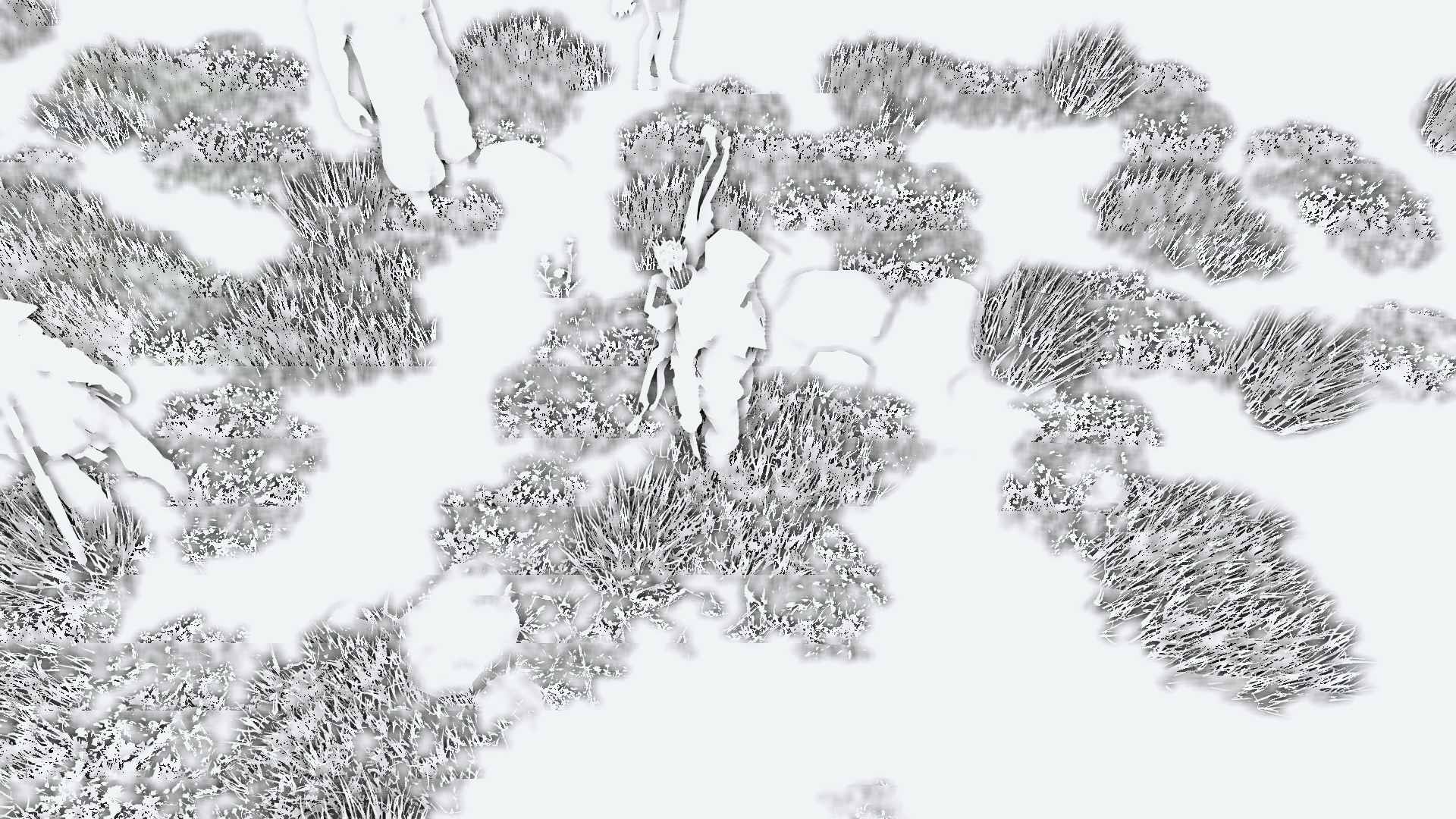
Yo Marty, nice work on the newest update. I'm mostly loving everything you've done except for this weird issue I'm getting with Raymarch AO. Any idea why I'm getting these weird horizontal stripes that cause some areas to be blurry?
AO Config:
AO Config:
Warning: Spoiler!
Code:
//AMBIENT OCCLUSION
#define AO_METHOD 2 //[1 to 2] 1: SSAO 2: Raymarch AO
#define AO_SHARPNESS 1.8 //[0.05 to 2.0] 1: AO sharpness, higher means more sharp geometry edges but noisier AO, less means smoother AO but blurry in the distance.
#define AO_DEBUG 1 //[0 or 1] Enables raw debug output (only shadowing/brightening) without color information.
#define AO_LUMINANCE_CONSIDERATION 1 //[0 or 1] Enables dampening of AO intensity on bright pixels, to preserve bright light sprites or beter lit areas.
#define AO_LUMINANCE_LOWER 0.1 //[0.0 to 1.0] Lower brightness threshold where AO starts to fade out. Below this threshold AO has full power.
#define AO_LUMINANCE_UPPER 0.3 //[0.0 to 1.0] Upper brightness threshold where AO starts to fade out. Above this threshold AO is 0.
#define iSSAOSamples 32 //[32 to 128] Amount of samples. Don't set too high or shader compilation time goes through the roof.
#define fSSAORange 50.0 //[10.0 to 50.0] SSAO sampling range. High range values might need more samples so raise both.
#define fSSAODarkeningAmount 1.5 //[0.0 to 5.0] Amount of SSAO corner darkening
#define fSSAOBrighteningAmount 1.0 //[0.0 to 5.0] Amount of SSAO edge brightening
#define iRayAOSamples 64 //[10 to 78] Amount of samples "rays" Higher means more accurate AO but also less performance.
#define fRayAOSamplingRange 0.0001 //[0.0001 to 0.02] Range of AO sampling. Higher values ignore small geometry details and shadow more globally.
#define fRayAOMaxDepth 0.1 //[0.01 to 0.2] Range clip factor to avoid far objects to occlude close objects just because they are besides each other on screen.
#define fRayAOMinDepth 0.0002 //[0.000 to 0.001] Minimum depth difference cutoff to prevent (almost) flat surfaces to occlude themselves.
#define fRayAOPower 1.5 //[0.2 to 5.0] Amount of darkening.
Please Log in or Create an account to join the conversation.
- Marty McFly
- Topic Author
Less
More
11 years 8 months ago - 11 years 8 months ago #308
by Marty McFly
Replied by Marty McFly on topic MasterEffect ReBorn official thread
That's depth depending blur. See, I blur the AO with a H V gaussian blur and check the depth difference from the samples. If the difference is too high, it discards the current sample, this is to prevent the AO from behind the grass to blur into the grass itself, just an example. The AO sharpness determines how big the depth difference can be, lesser value means more depth difference allowed. You happen to see just the threshold, the sharp areas from the grass have a big enough depth difference, the blurred ones don't. I would recommend raising the sharpness value to about 2.0.
Last edit: 11 years 8 months ago by Marty McFly.
Please Log in or Create an account to join the conversation.
- brussell
Less
More
11 years 8 months ago - 11 years 8 months ago #309
by brussell
Replied by brussell on topic MasterEffect ReBorn official thread
Marty, the CA fix hasn't survived the migration to your new version. So here it is again:
Also you should consider moving the PostFX pass after the SMAA pass, because otherwise SMAA doesn't get applied on the colorshifted areas. Example (most visible in the upper left corner): before SMAA pass , after SMAA pass
edit: I've just noticed that this solution only works with removed HDR-textures and samplers (as I did with my recent SMAA-version of MER). So it seems you need to find another solution for this problem.
Code:
float4 PS_ME_PostFX(VS_OUTPUT_POST IN) : COLOR
{
...
float LensZoom = 1.0/fFisheyeZoom+(-1.0*fFisheyeColorshift);
...
}
Also you should consider moving the PostFX pass after the SMAA pass, because otherwise SMAA doesn't get applied on the colorshifted areas. Example (most visible in the upper left corner): before SMAA pass , after SMAA pass
edit: I've just noticed that this solution only works with removed HDR-textures and samplers (as I did with my recent SMAA-version of MER). So it seems you need to find another solution for this problem.
Last edit: 11 years 8 months ago by brussell.
Please Log in or Create an account to join the conversation.
- SunBroDave
Less
More
11 years 8 months ago #310
by SunBroDave
Replied by SunBroDave on topic MasterEffect ReBorn official thread
Marty McFly wrote: That's depth depending blur. See, I blur the AO with a H V gaussian blur and check the depth difference from the samples. If the difference is too high, it discards the current sample, this is to prevent the AO from behind the grass to blur into the grass itself, just an example. The AO sharpness determines how big the depth difference can be, lesser value means more depth difference allowed. You happen to see just the threshold, the sharp areas from the grass have a big enough depth difference, the blurred ones don't. I would recommend raising the sharpness value to about 2.0.
Hmm I understand the logic but in practice there's just a super noticeable and distracting shimmering as you run through grass for example. Any way to make the different depth regions less noticeable so that they're less distracting while playing?
Please Log in or Create an account to join the conversation.
- GroinShooter
Less
More
11 years 8 months ago #311
by GroinShooter
Replied by GroinShooter on topic MasterEffect ReBorn official thread
Sorry if someone already asked this but what happened to filmgrain in the latest version? It used to be "animated" but now it's just a still image.
Please Log in or Create an account to join the conversation.
- Marty McFly
- Topic Author
Less
More
11 years 8 months ago - 11 years 8 months ago #312
by Marty McFly
Replied by Marty McFly on topic MasterEffect ReBorn official thread
brussell wrote: Marty, the CA fix hasn't survived the migration to your new version. So here it is again:
Code:float4 PS_ME_PostFX(VS_OUTPUT_POST IN) : COLOR { ... float LensZoom = 1.0/fFisheyeZoom+(-1.0*fFisheyeColorshift); ... }
Also you should consider moving the PostFX pass after the SMAA pass, because otherwise SMAA doesn't get applied on the colorshifted areas. Example (most visible in the upper left corner): before SMAA pass , after SMAA pass
edit: I've just noticed that this solution only works with removed HDR-textures and samplers (as I did with my recent SMAA-version of MER). So it seems you need to find another solution for this problem.
From my understanding, it should be like it is atm. Colorshift produces aliasing so it's just logical that AA happens after it. You say " moving the PostFX pass after the SMAA pass, because otherwise SMAA doesn't get applied on the colorshifted areas." but that's just plain wrong, if I move PostFX after SMAA, the image gets antialiased first and colorshifted after. Or did I get you wrong? Btw are you sure you switched the pass order properly because if you missed a few things, AA gets applied and PostFX then grabs the color information from before the AA pass.
Warning: Spoiler!
Code:
pass ME_PostFX
{
VertexShader = VS_MasterEffect;
PixelShader = PS_ME_PostFX;
RenderTarget = texHDR1;
}
#if (USE_SMAA == 1)
pass SMAA_EdgeDetection //First SMAA Pass
{
VertexShader = SMAAEdgeDetectionVSWrap;
#if (iSMAAEdgeDetectionMode == 1)
PixelShader = SMAALumaEdgeDetectionPSWrap;
#elif (iSMAAEdgeDetectionMode == 3)
PixelShader = SMAADepthEdgeDetectionPSWrap;
#else
PixelShader = SMAAColorEdgeDetectionPSWrap; //Probably the best in most cases so I default to this.
#endif
StencilEnable = true;
StencilPass = REPLACE;
StencilRef = 1;
RenderTarget = texEdges;
}
pass SMAA_BlendWeightCalculation //Second SMAA Pass
{
VertexShader = SMAABlendingWeightCalculationVSWrap;
PixelShader = SMAABlendingWeightCalculationPSWrap;
StencilEnable = true;
StencilPass = KEEP;
StencilFunc = EQUAL;
StencilRef = 1;
RenderTarget = texBlend;
}
pass SMAA_NeighborhoodBlending //Third SMAA Pass
{
VertexShader = SMAANeighborhoodBlendingVSWrap;
PixelShader = SMAANeighborhoodBlendingPSWrap;
#if (iSMAADebugOutput == 5)
// Use the stencil so we can show it.
StencilEnable = true;
StencilPass = KEEP;
StencilFunc = EQUAL;
StencilRef = 1;
#else
// Process all the pixels.
StencilEnable = false;
#endif
RenderTarget = texHDR2;
}
#endif
pass ME_Overlay
{
VertexShader = VS_MasterEffect;
PixelShader = PS_ME_Overlay;
}
}
And you posted a CA fix but that was different to what you've posted now. And it is still no "fix" because it ignores the usual distortion and IMO there is nothing to fix because people should adjust distortion and color shift and in case there are any bugged edges, use lenszoom to zoom in until these edges are outside the screen boundaries. If there's anything to fix then something that takes colorshift, distortion and cubic distortion into account to make sure the bugged edges are always outside the screen bounds.
Last edit: 11 years 8 months ago by Marty McFly.
Please Log in or Create an account to join the conversation.
- jmp909
Less
More
11 years 8 months ago - 11 years 2 weeks ago #313
by jmp909
Replied by jmp909 on topic MasterEffect ReBorn official thread
[edit: it was forced SGSSAA and MFAA that was causing my issue below]
not sure if you caught this thread but I assume it is affecting SMAA? (whilst you are discussing PostFX etc)
reshade.me/forum/shader-troubleshooting/...t-no-effects-enabled
the render texture is downsampled (blurred) from what I can tell currently due to use of LINEAR vs POINT mips.
just analysis by elimination. was ok in last version of MFX.
thanks
J
not sure if you caught this thread but I assume it is affecting SMAA? (whilst you are discussing PostFX etc)
reshade.me/forum/shader-troubleshooting/...t-no-effects-enabled
the render texture is downsampled (blurred) from what I can tell currently due to use of LINEAR vs POINT mips.
just analysis by elimination. was ok in last version of MFX.
thanks
J
Last edit: 11 years 2 weeks ago by crosire. Reason: Fixed link
Please Log in or Create an account to join the conversation.
- brussell
Less
More
11 years 8 months ago - 11 years 8 months ago #314
by brussell
Replied by brussell on topic MasterEffect ReBorn official thread
Regarding CA: Well, maybe it is no fix, but the screen looks more correct, at least with small color shift values (and no distortion).
The other issue: Yes, SMAA pass is after PostFX, but it doesn't work well (see the left picture). It only looks right with the applied "tweaks" I've mentioned. And in that case only with changed pass order.
edit:
The other issue: Yes, SMAA pass is after PostFX, but it doesn't work well (see the left picture). It only looks right with the applied "tweaks" I've mentioned. And in that case only with changed pass order.
edit:
Yeah sorry. I meant it in the way you wrote: First SMAA then Colorshift of the antialiased image. But shouldn't be that the preferred way, since SMAA doesn't work well with colorshifted edges (as you see in the pictures)?You say " moving the PostFX pass after the SMAA pass, because otherwise SMAA doesn't get applied on the colorshifted areas." but that's just plain wrong, if I move PostFX after SMAA, the image gets antialiased first and colorshifted after. Or did I get you wrong?
Last edit: 11 years 8 months ago by brussell.
Please Log in or Create an account to join the conversation.
- Marty McFly
- Topic Author
Less
More
11 years 8 months ago #315
by Marty McFly
Replied by Marty McFly on topic MasterEffect ReBorn official thread
Hmm I wonder why, because color shifted areas have the biggest color difference one can imagine. Except one uses luma detection with SMAA. Let me do some experiments.
Please Log in or Create an account to join the conversation.
- BrandonHortman
Less
More
11 years 8 months ago #316
by BrandonHortman
Replied by BrandonHortman on topic MasterEffect ReBorn official thread
Love your work Marty, I'm a huge fan.
I do have some criticism though. I feel that the DOF was far more adjustable in the last release.
I find it to be very static now ( always the same amount of blur regardless of distance from focus point)
Am I missing something?
I do have some criticism though. I feel that the DOF was far more adjustable in the last release.
I find it to be very static now ( always the same amount of blur regardless of distance from focus point)
Am I missing something?
Please Log in or Create an account to join the conversation.
- crosire
Less
More
11 years 8 months ago - 11 years 2 weeks ago #317
by crosire
Replied by crosire on topic MasterEffect ReBorn official thread
Just so no more reports fly in: MasterEffect 1.1.1111 has a bug which makes it incompatible with ReShade 0.16.0.
Here's a fix
.
Last edit: 11 years 2 weeks ago by crosire. Reason: Fixed link
The following user(s) said Thank You: sajittarius, BrandonHortman
Please Log in or Create an account to join the conversation.
- SunBroDave
Less
More
11 years 8 months ago #318
by SunBroDave
Replied by SunBroDave on topic MasterEffect ReBorn official thread
Reposted from the Shader Suggestions subforum:
Would it be possible to look at the game's mask before calculating the post processing effects, and then not apply any effects based on the areas in the mask? In other words, the problem is that if you make a mask for a game's UI, while the effects aren't applied on top of the UI areas, if for example a UI element was a certain brightness level that would trigger bloom or a lensflare to be applied, then that effect is still applied to the image, just behind the UI. Here's an example:
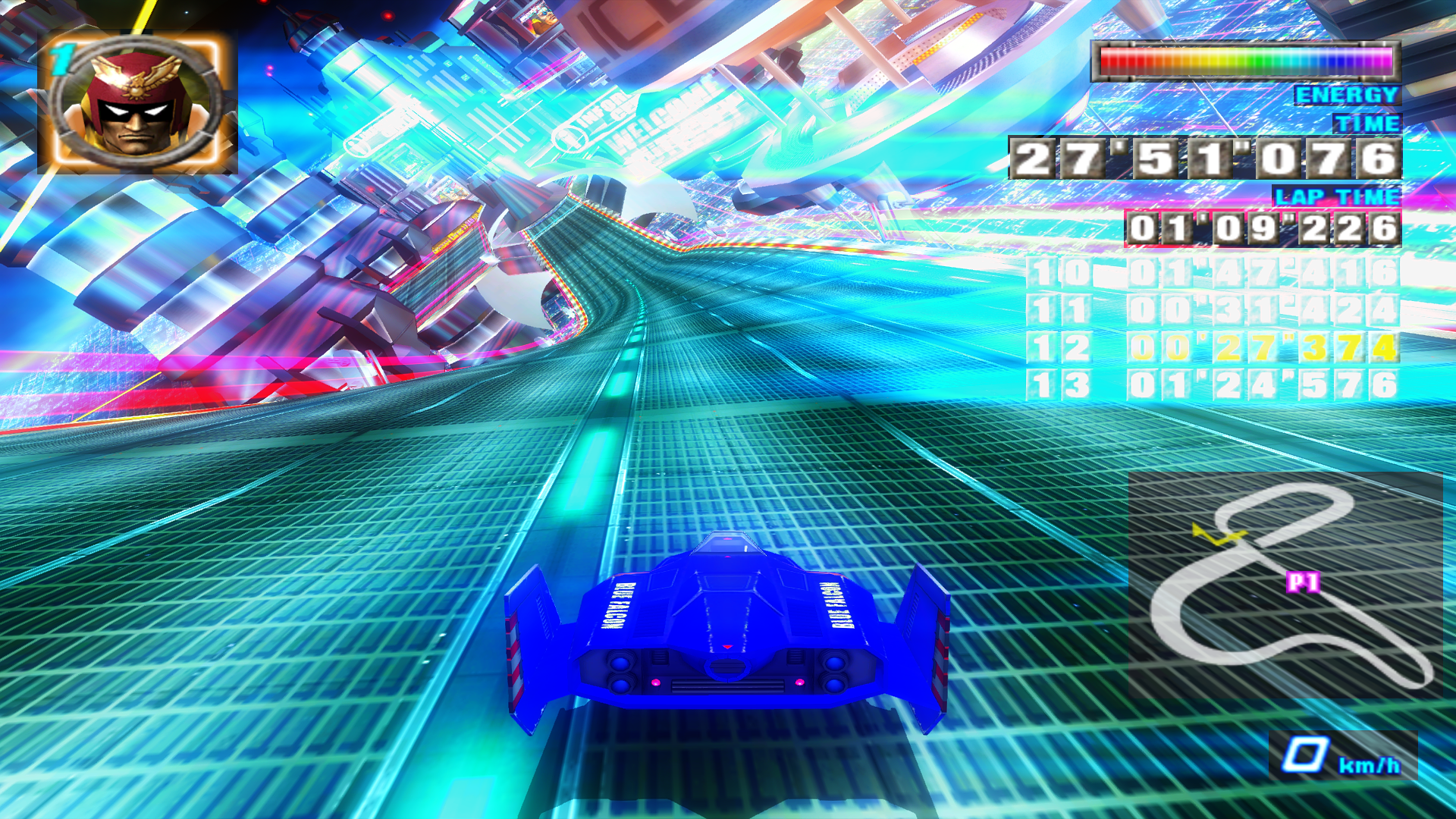
So looking at the HUD on the upper right, the lensflares are not applied over the HUD, which is good, but those lensflares shouldn't be there at all. The HUD is still causing lensflares to be applied everywhere else, causing most of that top right corner of the screen to be covered in lensflares. In an ideal situation, not only would the UI not have effects placed on top of it, but it also wouldn't trigger effects to be applied anywhere else on the image.
Would it be possible to look at the game's mask before calculating the post processing effects, and then not apply any effects based on the areas in the mask? In other words, the problem is that if you make a mask for a game's UI, while the effects aren't applied on top of the UI areas, if for example a UI element was a certain brightness level that would trigger bloom or a lensflare to be applied, then that effect is still applied to the image, just behind the UI. Here's an example:
So looking at the HUD on the upper right, the lensflares are not applied over the HUD, which is good, but those lensflares shouldn't be there at all. The HUD is still causing lensflares to be applied everywhere else, causing most of that top right corner of the screen to be covered in lensflares. In an ideal situation, not only would the UI not have effects placed on top of it, but it also wouldn't trigger effects to be applied anywhere else on the image.
Please Log in or Create an account to join the conversation.
- Marty McFly
- Topic Author
Less
More
11 years 8 months ago #319
by Marty McFly
Replied by Marty McFly on topic MasterEffect ReBorn official thread
Right, that's an issue I didn't see coming. Damn that needs a bit of coding, will see what I can do.
The following user(s) said Thank You: SunBroDave, vfxninjaeditor
Please Log in or Create an account to join the conversation.
- vfxninjaeditor
Less
More
11 years 8 months ago #320
by vfxninjaeditor
Replied by vfxninjaeditor on topic MasterEffect ReBorn official thread
Fantastic! I finally have Reshade and ME working in Unreal Engine 4. This is really nice while I am working on game development. Probably the best thing so far is the sharpening. That temporal AA from UE4 does a fantastic job killing jaggies, but it makes everything super blurry.
Please Log in or Create an account to join the conversation.


