Quake 3 weird bugs with Reshade
- SolivaN
- Topic Author
Less
More
10 months 4 weeks ago - 10 months 3 weeks ago #1
by SolivaN
Quake 3 weird bugs with Reshade was created by SolivaN
Hi there crosire, hope your fine men.
Well, like i said in previous post, i want to explain what happens when you use Reshade with Quake3.
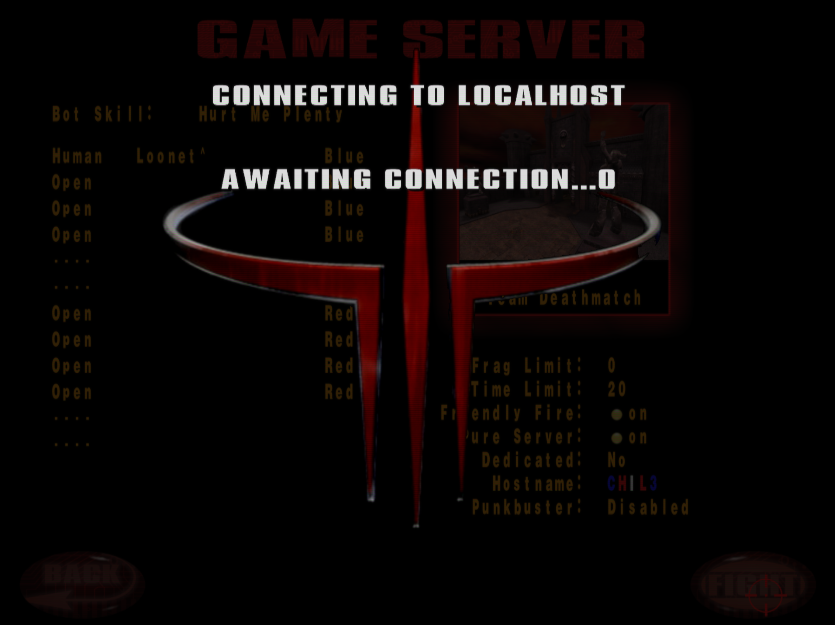
1) strange 2D overlap effect while load a map
where happen: in SINGLEPLAYER or MULTIPLAYER menus
explanation: when we load a map, a strange overlap 2D layers appears
technical: may be a 2D framebuffer conflict with Reshade hook?
2) lost some gametype options
where happen: in MULTIPLAYER menu
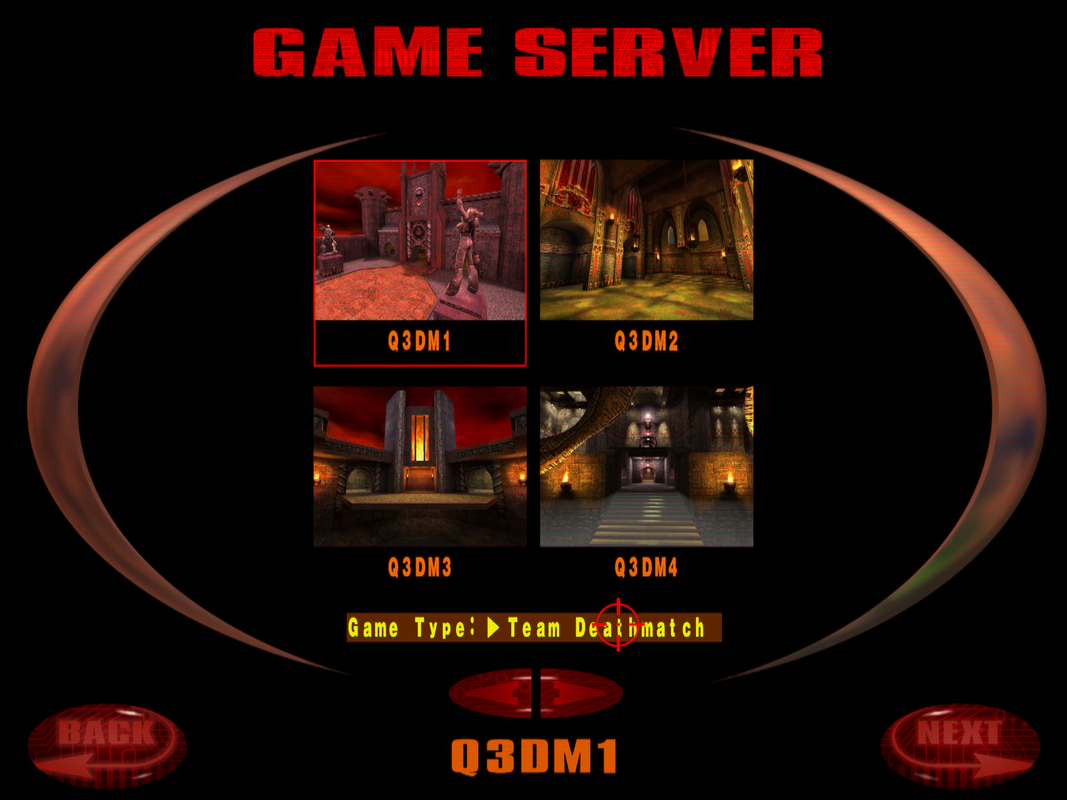
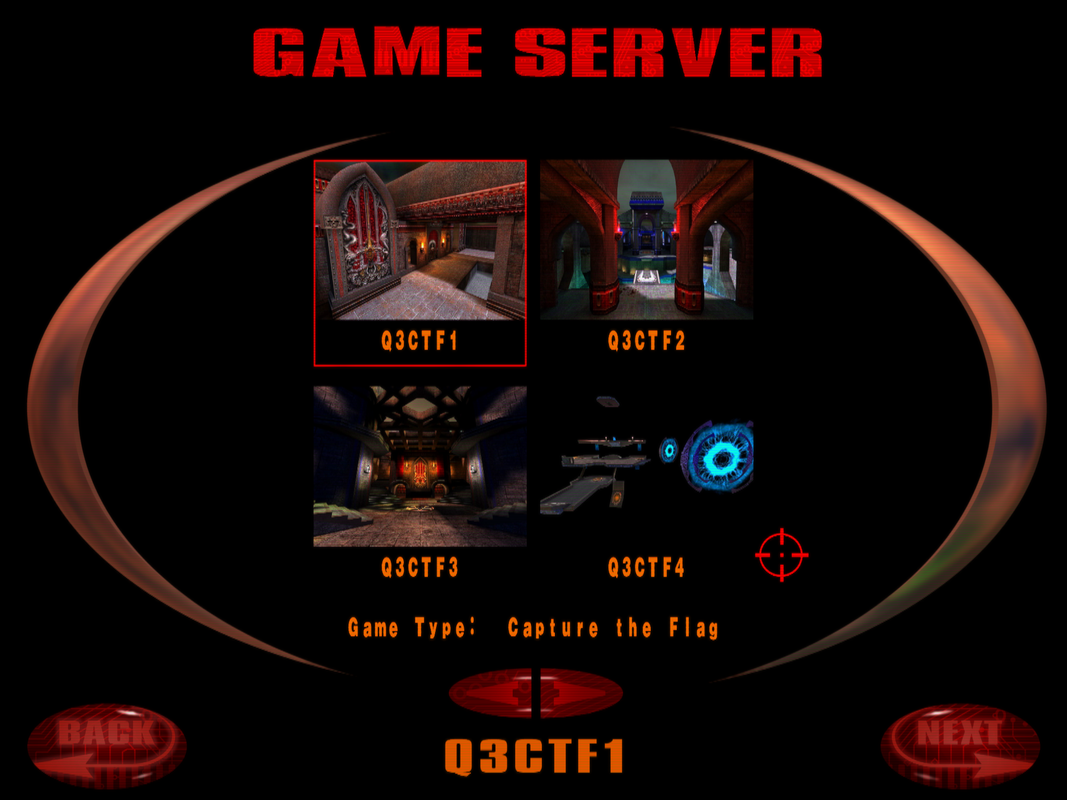
explanation: when you tray to change GAME TYPE option, only Team Deathmatch or Capture the Flag options are available. Free for All and Tournament options are lost
technical: the same before, seems quake3 manage 2D layers for menus and options where conflict with Reshade hook?
3) infinite map loading bug
where happens: only happens in MULTIPLAYER menu, SINGLEPLAYER work fine
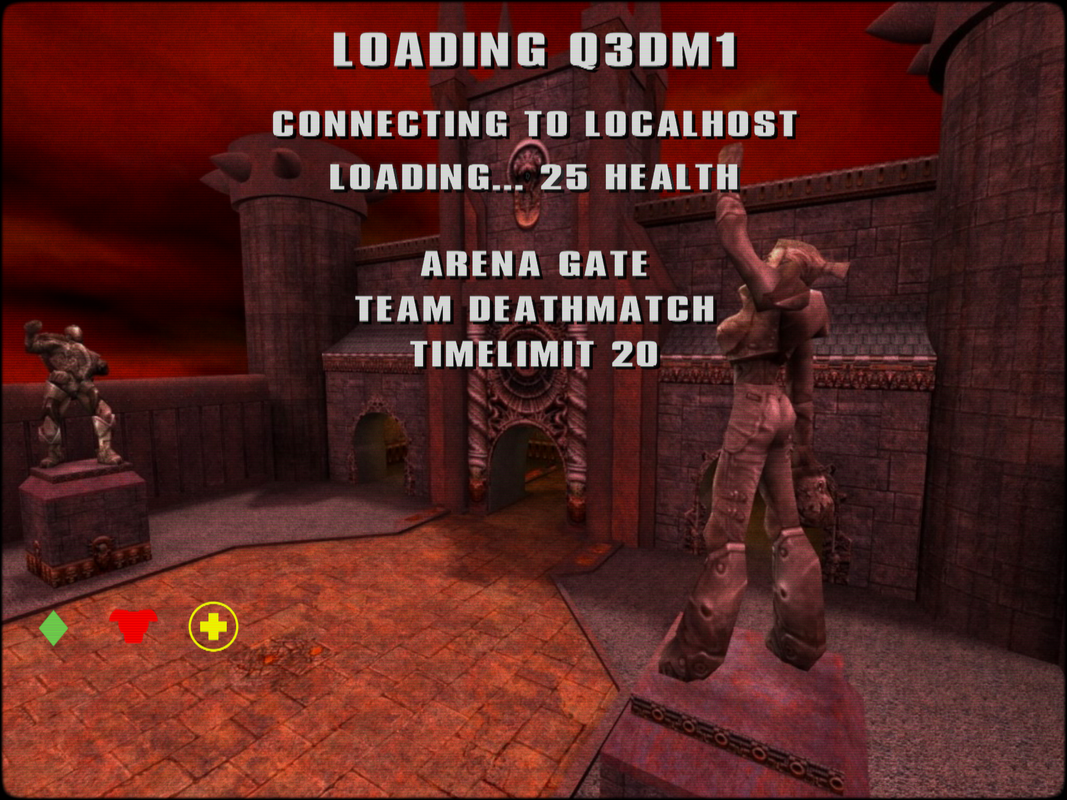
explanation1: select any map from MULTIPLAYER and hit FIGHT button. Quake3 will stuck on an infinite loop. You need to press ESC to stop the loop
explanation2: is possible to load a map manually, from console typing /map q3dm1 or whatever map you want
technical: again, i think quake3 can't manage correctly these 2D layers because of Reshade hook, making quake3 can't release these 2D screens?
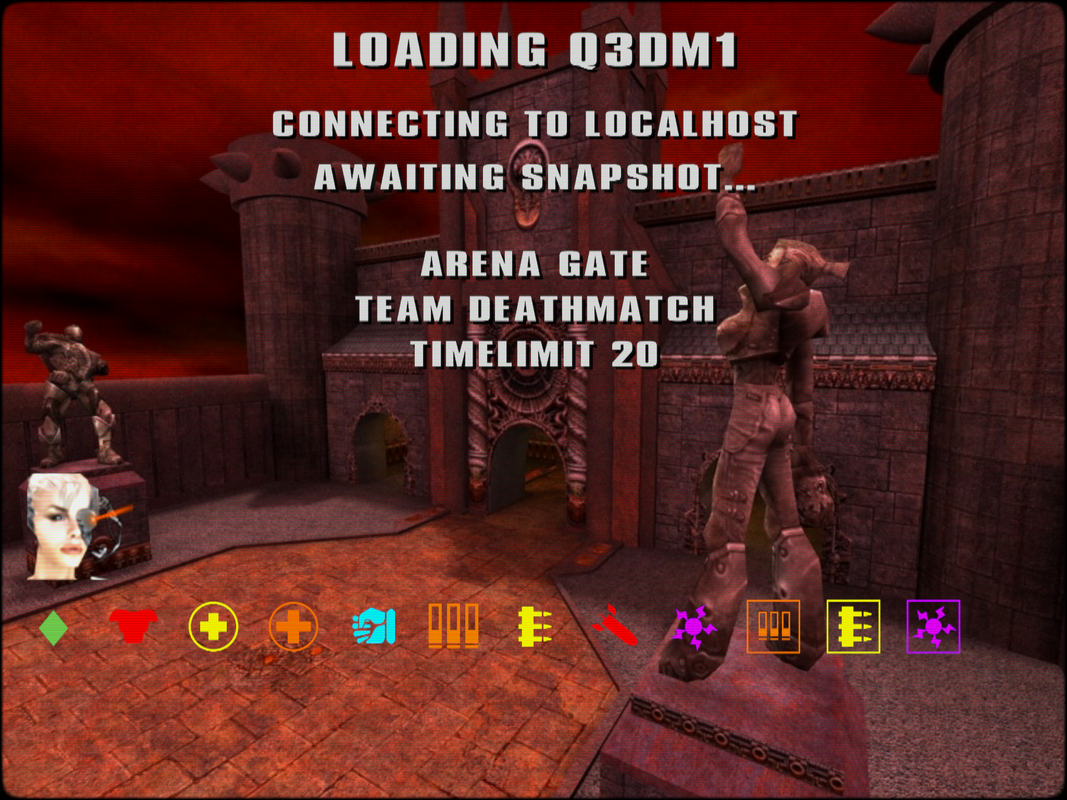
4) cinematic playback bug
where happens: when you win a SINGLEPLAYER TIER and in CINEMATICS menu
explanation 1: when you win a SINGLEPLAYER TIER, quake3 will simply skip the cinematic
explanation 2: when you simply try to play a CINEMATIC from the menu, you can hear the video. you need to press ESC key to see the video
technical: all this is around the 2D elements of the game. Reshade seems hook some 2D screen framebuffer elements, causing quake3 have this strange behavior
hope you can help me and find this stranges problems
vanilla quake3 looks spectacular with Reshade
well, see ya and thnks for all your work!
Well, like i said in previous post, i want to explain what happens when you use Reshade with Quake3.
1) strange 2D overlap effect while load a map
where happen: in SINGLEPLAYER or MULTIPLAYER menus
explanation: when we load a map, a strange overlap 2D layers appears
technical: may be a 2D framebuffer conflict with Reshade hook?
2) lost some gametype options
where happen: in MULTIPLAYER menu
explanation: when you tray to change GAME TYPE option, only Team Deathmatch or Capture the Flag options are available. Free for All and Tournament options are lost
technical: the same before, seems quake3 manage 2D layers for menus and options where conflict with Reshade hook?
3) infinite map loading bug
where happens: only happens in MULTIPLAYER menu, SINGLEPLAYER work fine
explanation1: select any map from MULTIPLAYER and hit FIGHT button. Quake3 will stuck on an infinite loop. You need to press ESC to stop the loop
explanation2: is possible to load a map manually, from console typing /map q3dm1 or whatever map you want
technical: again, i think quake3 can't manage correctly these 2D layers because of Reshade hook, making quake3 can't release these 2D screens?
4) cinematic playback bug
where happens: when you win a SINGLEPLAYER TIER and in CINEMATICS menu
explanation 1: when you win a SINGLEPLAYER TIER, quake3 will simply skip the cinematic
explanation 2: when you simply try to play a CINEMATIC from the menu, you can hear the video. you need to press ESC key to see the video
technical: all this is around the 2D elements of the game. Reshade seems hook some 2D screen framebuffer elements, causing quake3 have this strange behavior
hope you can help me and find this stranges problems
vanilla quake3 looks spectacular with Reshade
well, see ya and thnks for all your work!
Last edit: 10 months 3 weeks ago by SolivaN.
Please Log in or Create an account to join the conversation.
- SolivaN
- Topic Author
Less
More
- SolivaN
- Topic Author
Less
More
Hi crosire,I finally found a very strong clue about the Quake 3 problems I reported earlier in this thread.Originally I thought some of the problems could be related to the OpenGL/framebuffer hooks because several of the symptoms looked graphical: menu layers behaving strangely, missing gametype choices, infinite loading from the Multiplayer menu, cinematics not displaying correctly, etc.However, I have now found that all of those problems, together with the mouse problems, disappear when ReShade's input hooks are disabled.I tested with:With this enabled:
here is, and the Quake 3 Win32 source confirms:So vanilla Quake 3 is using the old DirectInput 3 API.The relevant Q3 code is in:Quake 3's DirectInput buffering is also extremely old/smallQuake 3 defines:and uses it directly as:More importantly,drains buffered DirectInput events one object at a time:So every buffered DirectInput object requires anothercall.Buttons are handled as individual transitions:After draining the buffered events, Q3 separately obtains relative movement with:Therefore Q3 combines:
, whendetects:ReShade identifies it asand installs hooks directly on:So for vanilla Quake 3 the path effectively becomes:And because Quake 3 requests only oneper call, the ReShadehook is crossed once for every buffered mouse object.Possible DI_BUFFEROVERFLOW interactionThere is another detail which may be important.Microsoft documents thatcan return:when buffered input was lost.is equal to, so it is still considered a successful HRESULT by.Quake 3 only checks:Therefore:Q3 does not explicitly detect that buffered input has been lost.This could be especially problematic for button events because DOWN and UP are independent buffered objects.For example, losing a button release could leave Quake 3's logical input state inconsistent and explain the phantom/repeated firing behavior.I cannot prove that buffer overflow is the exact internal cause yet, but it seems like a plausible mechanism considering:
wrapper already explicitly handles this case:when input is being blocked.So this seems like a particularly interesting area to investigate.ReShade workaround proves the input hook is involvedThe most important result is this:The only disadvantage is that this workaround also disables the ReShade overlay input, becausecurrently disables all three together in:So I cannot use the normal ReShade overlay while using the workaround.Possible ReShade-side fix / compatibility optionWould it be possible to separate the DirectInput hooks from the User32 input hooks?For example, something similar to:or an INI option such as:which would disable only:while retaining:This would be a very useful compatibility fallback for old games using legacy DirectInput implementations like Quake 3.The obvious place seems to be the input hook registration block in:Currently everything is controlled by the single:condition.A second possible place to investigate is:specifically the path:Sincealready receives, another possible compatibility safeguard could be to avoid installing the device-level DirectInput hooks for very old interfaces such as, or make that behavior optional.For example, conceptually:I think an opt-in switch would probably be safer than automatically changing behavior for every old DirectInput game.That would allow ReShade to leave the application's ancient DirectInput path completely untouched while still keeping the rest of ReShade operational.I am not suggesting that Quake 3's DirectInput implementation is good — it clearly is very old and fragile — but since vanillacannot be changed by ReShade users, a selective DirectInput passthrough option in ReShade could be a useful compatibility safeguard.The key new finding is that disabling ReShade input hooks completely fixes the problem, even at only 500 Hz polling.Hopefully this gives you a much narrower place to investigate than my original report.
set "RESHADE_DISABLE_INPUT_HOOK=1"
start "" "H:\Juegos\Quakes\Quake III Arena\inject32.exe" quake3.exe- phantom/repeated mouse clicks disappear completely;
- mouse sensitivity becomes perfectly smooth again;
- the strange sudden sensitivity/acceleration-like jumps disappear;
- the menu/loading/UI glitches I reported earlier disappear too.
Redirecting DirectInputCreateA(... dwVersion = 300 ...)
Redirecting IDirectInputA::CreateDevice(... GUID_SysMouse ...)
dwVersion = 3000x0300#define DIRECTINPUT_VERSION 0x0300code/win32/win_input.c
code/win32/win_local.h#define DINPUT_BUFFERSIZE 16DIPROP_BUFFERSIZE = 16IN_DIMouse()for (;;) {
dwElements = 1;
hr = IDirectInputDevice_GetDeviceData(
g_pMouse,
sizeof(DIDEVICEOBJECTDATA),
&od,
&dwElements,
0
);GetDeviceData()case DIMOFS_BUTTON0:
if (od.dwData & 0x80)
Sys_QueEvent(... K_MOUSE1, qtrue ...);
else
Sys_QueEvent(... K_MOUSE1, qfalse ...);IDirectInputDevice_GetDeviceState(...)
mx = state.lX;
my = state.lY;- a 16-element buffered event queue;
- one-event-per-call;
GetDeviceData()
- button DOWN/UP transitions from that buffer;
- relative mouse movement from.
GetDeviceState()
source/windows/dinput.cppCreateDevicerguid == GUID_SysMouseDIDEVTYPE_MOUSEIDirectInputDevice::GetDeviceState
IDirectInputDevice::GetDeviceDataQuake3 IN_DIMouse()
|
+-- GetDeviceData()
| |
| +-- ReShade hook
| |
| +-- original DirectInput
|
+-- GetDeviceState()
|
+-- ReShade hook
|
+-- original DirectInputDIDEVICEOBJECTDATAGetDeviceDataGetDeviceData()DI_BUFFEROVERFLOWDI_BUFFEROVERFLOWS_FALSESUCCEEDED()if (FAILED(hr)) {
break;
}DI_OK -> accepted
DI_BUFFEROVERFLOW -> also accepted- Q3 has only a 16-object buffer;
- it reads only one object percall;
GetDeviceData()
- ReShade hooks every one of those calls;
- the symptoms completely disappear when ReShade's input hooking is bypassed.
GetDeviceDatahr = DI_OK; /* Overwrite potential 'DI_BUFFEROVERFLOW' */Normal ReShade input hooks:
phantom mouse events
unstable/sudden mouse sensitivity
UI/menu/loading/cinematic problems
RESHADE_DISABLE_INPUT_HOOK=1:
all of these problems disappearRESHADE_DISABLE_INPUT_HOOKdll_main.cppreshade::hooks::register_module(L"user32.dll");
reshade::hooks::register_module(get_system_path() / L"dinput.dll");
reshade::hooks::register_module(get_system_path() / L"dinput8.dll");RESHADE_DISABLE_DINPUT_HOOK=1HookDirectInput=0register_module(... dinput.dll);
register_module(... dinput8.dll);register_module(L"user32.dll");source/dll_main.cppRESHADE_DISABLE_INPUT_HOOKsource/windows/dinput.cppDirectInputCreateA
-> IDirectInputA::CreateDevice
-> GUID_SysMouse
-> hook GetDeviceState
-> hook GetDeviceDataDirectInputCreateAdwVersion0x0300if (dwVersion <= 0x0300 && legacy_dinput_passthrough)
{
// Do not install GetDeviceState/GetDeviceData hooks
}quake3.exePlease Log in or Create an account to join the conversation.
